Plan, billing, invoices and cancel
Available onFreeProResearch
Plan and usage shows which plan you are on, how much of your monthly AI budget you have used, and your invoices. Changing or cancelling a paid plan happens in Stripe, which Readsira opens for you. What each plan includes is on Plan limits.
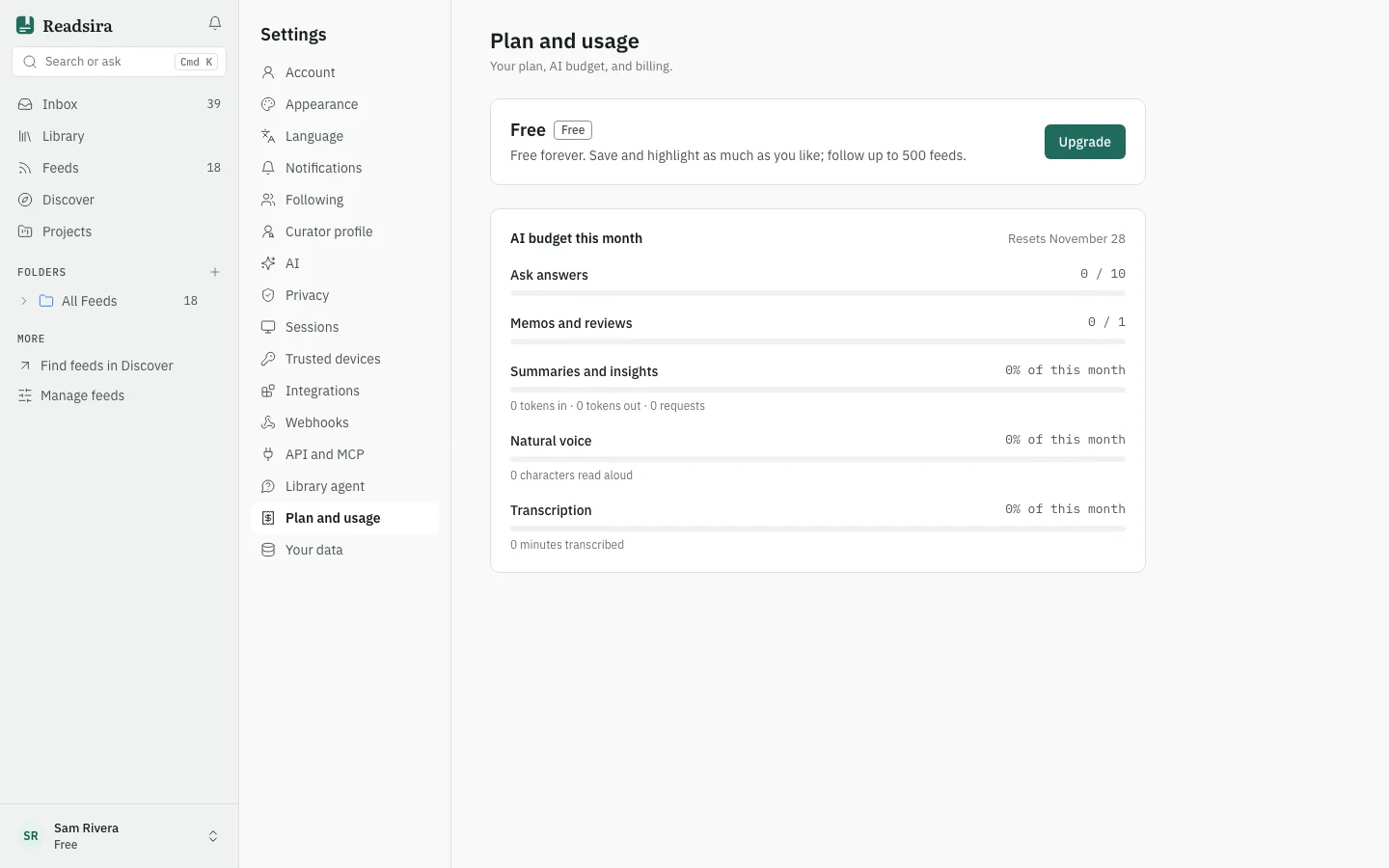
See your plan and usage
- Open Settings and choose Plan and usage.
- The top card names your plan and says where it comes from, for example "Billed monthly, renews" with a date, a trial with the days left, or a plan gifted by Readsira.
- AI budget this month shows the date it resets. Limits that are counted, such as answers from Ask, are shown as used and maximum, with a warning when you are close. AI use that is not counted, such as summaries, voice and transcription, is shown as a share of this month. When a limit is used up, the card says when it comes back.
Limits differ by plan. See Plan limits for the numbers.
Start a free trial
If you are eligible, the Free plan offers Start 14-day trial: Pro for 14 days, no card needed. Confirm your email address first. Each email address can start one trial. The trial ends by itself and you move back to Free unless you subscribe.
Upgrade to a paid plan
- Press Upgrade. The plan page opens. See Choose a plan.
- Pick monthly or annual billing and choose a plan.
- Pay on the Stripe checkout page. Prices include VAT.
You come back to Readsira when the payment is done, and the new plan applies.
Change plan, update your card or cancel
- On a paid plan, open Plan and usage and press Manage billing.
- Readsira opens the Stripe billing page. Stripe, not Readsira, runs that page, so its options and wording are Stripe's.
- There you can change plan or billing interval, update your payment method, and cancel.
After you cancel, the plan card says "Cancelled, ends" with a date. You keep the paid plan until then, and nothing is deleted when it ends. If a payment fails, the card says so and asks you to update your card in billing to keep your plan.
If you move to a lower plan, a banner shows what changed. Your library, feeds and highlights stay as they were. If you follow more feeds than the new plan allows, all of them keep updating, and you unfollow some before you can follow a new one.
Download invoices
Paid invoices are listed under Invoices with the date, plan, interval and amount. Press PDF to download the PDF, or View to open the invoice page when there is no PDF.
Tips
- Plan moves never delete your saves. Your library and exports stay available on Free.
- Deleting your account also stops a paid plan at the end of the billing period. See Delete your account.