Delete your account
Available onFreeProResearch
You can delete your account and all your data. Deletion is not instant: Readsira waits 14 days first. Until then you can change your mind and everything comes back as it was.
Before you start
- Download your data if you want a copy. See Privacy and your data.
- If you signed up with Google or an email link and have no password, sign in again within the last 10 minutes before you delete.
Delete your account
- Open Settings and choose Your data.
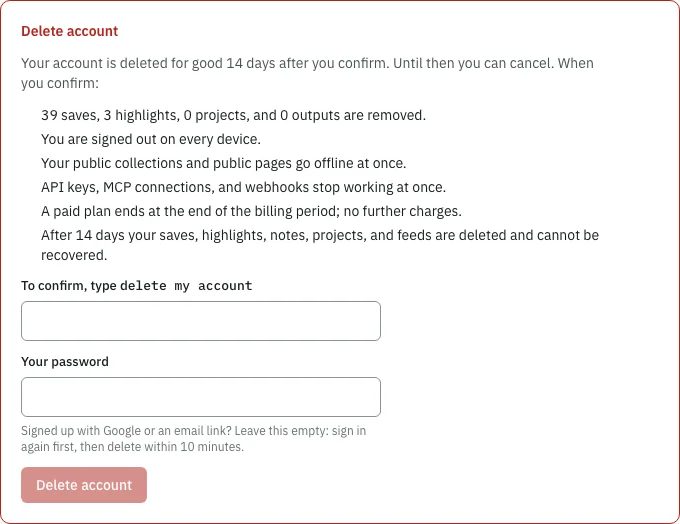
- Scroll to Delete account. The list there says what happens and shows how many saves, highlights, projects and outputs are removed.
- Type the words shown next to To confirm, type. The phrase is
delete my account, in English in every language. - Enter your password in Your password. Leave it empty if you have no password and signed in within the last 10 minutes.
- Press Delete account.
What happens when you confirm
- You are signed out on every device.
- Your public collections and public pages go offline at once.
- API keys, MCP connections and webhooks stop working at once.
- A paid plan ends at the end of the billing period. There are no further charges.
- You get an email about the deletion, another 3 days before it happens, and one when it is done.
Then you land on the page Account scheduled for deletion. It shows the date of the deletion and what will be deleted: your saves, highlights, feeds and collections.
Keep your account
Until the date on that page you have two ways back.
From the email. Open the keep-my-account link in the deletion email. The page Keep your account restores your account and says Deletion cancelled. You do not need to sign in first. A link stops working when it was already used, has expired, or a newer request replaced it; sign in instead.
From the app. Sign in. You land on the deletion page.
- Press Cancel deletion.
- The page says Your account is kept. Welcome back.. Press Continue.
Your saves, highlights, feeds and public collections are as you left them. If your paid plan ended in the meantime, you are on Free and can choose a plan again.
While the deletion is scheduled the page also offers Download my data so you can take a copy.
After the 14 days
Your saves, highlights, notes, projects and feeds are deleted for good and cannot be recovered. Once the deletion has started, the page says it can no longer be kept. For what Readsira keeps after that, see Privacy and your data.