Choose a model and use your own key
Available onProResearch
The AI settings let you choose how answers are written. On Pro and Research you can also send AI requests to your own provider with your own key.
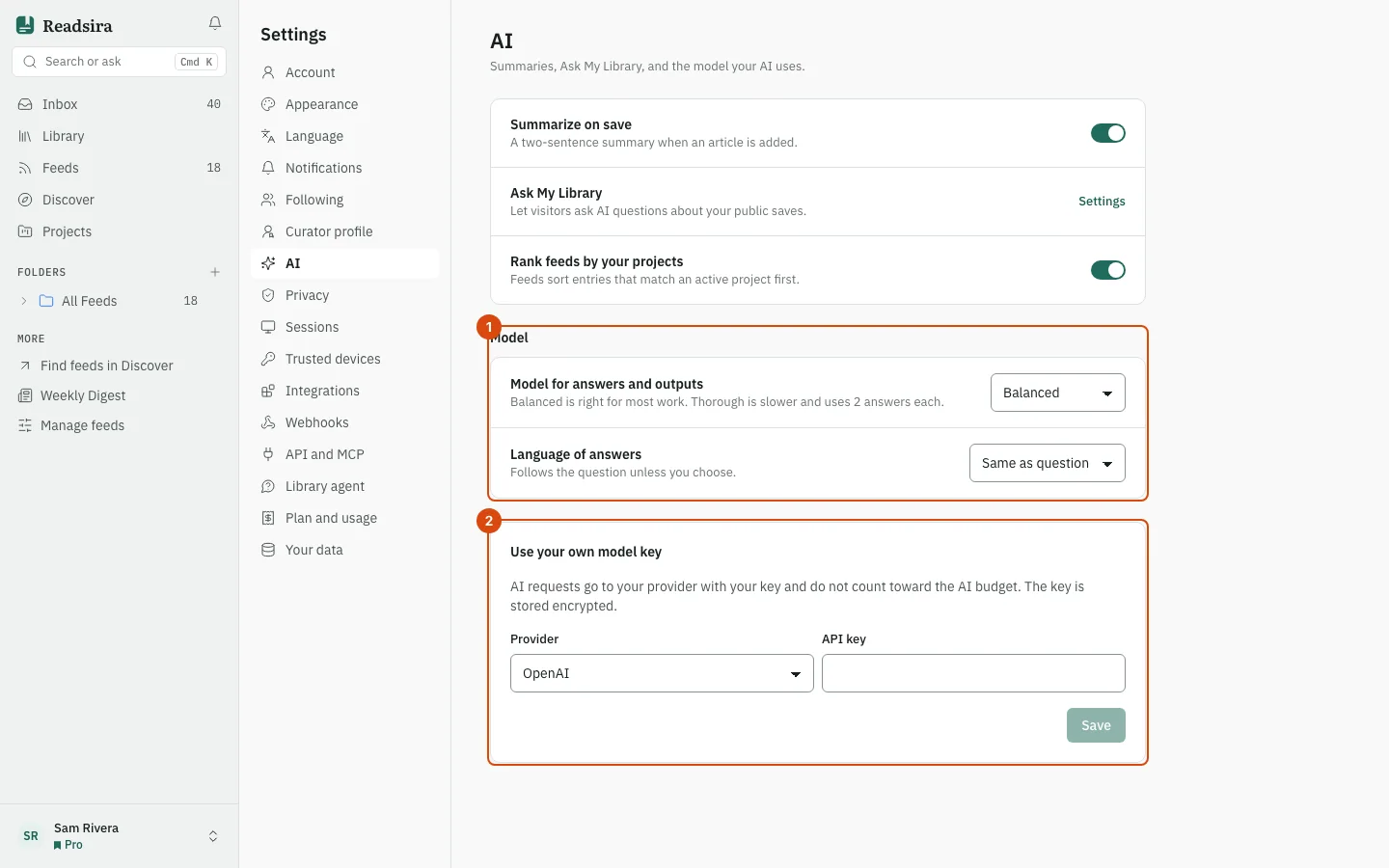
Steps: answer model and language
-
Open Settings and choose AI.
-
Under Model, pick the Model for answers and outputs: Balanced or Thorough. Balanced is right for most work. Thorough is slower and uses 2 answers each.
-
Pick the Language of answers. Same as question answers in the language of your question unless you choose another.
-
To summarise new saves automatically, turn on Summarize on save. A two-sentence summary is made when an item is added.
-
Rank feeds by your projects sorts feed entries that match an active project first.
Steps: your own model key
- In the same section, find the card Use your own model key.
- Choose the Provider: Anthropic, OpenAI, Groq or Ollama.
- Paste the key into API key. For Ollama, enter the address of your server in Server address instead.
- Press Save. The page says "Saved. AI requests now use your key."
- To check it, press Test. It tells you whether the provider accepts the key.
- To stop using it, press Remove. AI requests use Readsira again.
What changes with your own key
AI requests go to your provider with your key and do not count toward the AI budget. The key is stored encrypted, and the page shows only the first and last characters. Your provider bills you and applies its own terms to what it receives.